Ever been stuck in a match with someone who’s throwing grenades at teammates, blocking doorways, or just standing AFK while the enemy team farms kills?
Yeah, we’ve all been there.
The vote kick system exists for exactly these moments, but knowing when and how to use it properly makes all the difference.
Let’s break down everything you need to know about kicking players in Counter-Strike 2.
How to Vote Kick in CS2?
What Is the Vote Kick System in CS2?
Vote kicking is CS2’s built-in democracy tool.
It lets your team collectively decide whether someone needs to go.
Think of it as a group vote where everyone gets their say, but you need an overwhelming agreement before anyone actually gets removed.
The system works through majority voting.
When someone initiates a kick vote, every teammate sees a prompt asking whether they agree.
Press F1 for yes, F2 for no.
Simple enough, right?
But here’s the catch: you need 4 out of 5 players voting yes for it to work.
That’s a high bar, and it’s intentional.
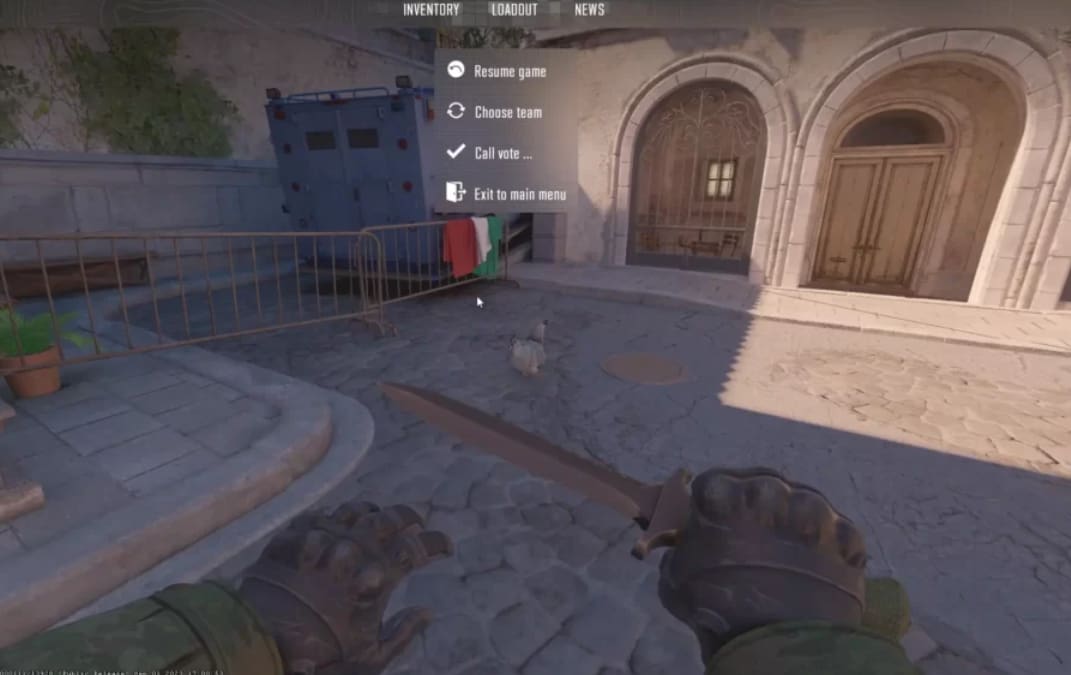
The Easy Way: Using the In-Game Menu
Most players stick with the standard menu method because it’s straightforward and gets the job done.
Here’s how it works:
- Hit ESC to open your menu
- Click “Call Vote”
- Select “Kick Player”
- Choose who you want gone from the player list
- Wait for teammates to respond
Your team sees the voting prompt immediately.
They vote yes with F1 or no with F2. If enough people agree, the player gets removed. If not, everyone goes back to playing.
Understanding the Vote Requirements
You need exactly 4 yes votes out of 5 total players for a kick to succeed.
Here’s the breakdown: when you start the vote, that’s already one yes vote (yours).
The player being kicked automatically gets counted as a no vote.
That leaves three teammates who all need to vote yes.
If even one person votes no or doesn’t vote at all, the kick fails.
| Vote Scenario | Result |
|---|---|
| You + 3 teammates vote Yes | Kick succeeds |
| You + 2 teammates vote Yes, 1 votes No | Kick fails |
| You + 2 teammates vote Yes, 1 doesn’t vote | Kick fails |
| Target player + anyone else votes No | Kick fails |
This high threshold exists to prevent abuse. It stops two or three players from ganging up on someone unfairly.
Console Commands for Vote Kicking
The console method gives you more control, especially if you know exactly who needs to go.
First, enable the developer console in Settings > Game.
Set “Enable Developer Console” to Yes. Now you can open it anytime by pressing the tilde key (~).
To kick someone via console:
- Type status to see all player IDs
- Find the player you want to kick (they’ll have a 5-digit ID)
- Type callvote kick [last 2 digits of their ID]
For example, if someone’s ID is 12345, you’d type: callvote kick 45
The vote goes out to your team just like the menu method.
When Should You Actually Vote to Kick?
Not every frustrating moment deserves a kick vote. The system exists for specific problems that genuinely ruin matches.
Legitimate reasons to kick someone:
- Toxic behavior – Constant harassment, slurs, or verbal abuse toward teammates
- AFK players – Someone idle for multiple rounds turns the game into a 4v5 and feeds the enemy economy
- Griefing – Intentionally flashing teammates, blocking in doorways, revealing positions, or causing team damage
- Obvious cheating – If your own teammate is blatantly hacking, kick them and report them
Bad reasons that waste everyone’s time:
- Poor performance – Having a bad game doesn’t justify removal
- Strategy disagreements – Different playstyles aren’t grounds for kicking
- Personal arguments – Playing 4v5 because you don’t like someone hurts your team more than theirs
How the CS2 Vote Kick Reddit Community Handles It
If you’ve spent time on r/GlobalOffensive or CS2 subreddits, you’ve seen the debates.
The community generally agrees on one thing: don’t abuse the system.
Common situations discussed on Reddit include premade groups kicking the solo player, players getting kicked right before winning to deny them the win, and vote kick abuse in lower ranks, where newer players get removed just for being inexperienced.
The consensus? Communicate first.
If someone’s making mistakes but trying, guide them. Save kicks for players actively ruining the experience.
Why CS2 Vote Kicks Fail?
The “cs2 vote kick failed” message pops up more often than people expect.
Here’s why:
Someone voted no or didn’t vote at all. Remember, you need all three remaining teammates to vote yes.
One abstention kills the vote.
Players also hesitate to kick in winnable matches.
Even if someone’s annoying, teammates might tolerate them if the score looks good.
Sometimes, the person being kicked has a friend in the match who automatically votes no to protect them.
Expert Insight: The Psychology Behind Vote Kicks
Here’s something most players don’t think about: Initiating a vote kick changes team dynamics immediately.
The moment that vote pops up, everyone’s focus shifts from the game to the drama.
You’ve just turned a tactical shooter into a referendum on someone’s behavior.
If the vote fails, you’re stuck playing with that person, AND they now know you tried to remove them.
Before hitting that vote button, ask yourself: Is this improving our chances of winning, or am I just venting frustration?
Experienced players know that keeping team morale intact often matters more than removing one underperforming player.
A 5v5 with mild tension beats a 4v5 any day.
CS2 vs CSGO: What Changed?
If you’re coming from CSGO, wondering how to vote kick in CSGO versus CS2, here’s what’s different:
CSGO had bot replacements. When someone got kicked, a bot filled their spot temporarily.
Not great, but better than nothing.
CS2 removed bots entirely from competitive modes.
Kick someone now, and you’re playing 4v5 for the rest of the match. No backup, no replacement.
This change makes vote kicking a bigger decision.
You’re not just removing a problem player; you’re accepting a numerical disadvantage for every remaining round.
Vote Kick Abuse and How Valve Responds
CS2 vote kick abuse happens. Premade groups sometimes gang up on solo queue players.
Others kick teammates right before winning to deny them the victory.
Valve tracks this behavior.
Players who frequently initiate kicks or get kicked repeatedly face cooldown penalties.
The system isn’t perfect, but it does catch serial abusers eventually.
If you’re experiencing consistent kick abuse, document it and submit reports.
Valve reviews patterns, not individual incidents.
How to Kick Yourself in CS2?
Sounds weird, but sometimes you need to leave a match without getting a full abandonment penalty.
The CS2 Reddit community discusses this frequently.
You can’t directly kick yourself through voting.
However, if you need to leave:
Ask a teammate to initiate a vote kick against you.
If the team agrees, you’re removed without the same penalty as abandoning.
Alternatively, excessive team damage triggers an auto-kick, but this tanks your trust factor and can get you banned.
Don’t do this.
The cleanest option? Just abandon honestly if you have a genuine emergency.
One abandonment won’t hurt you much if it’s rare.
Vote Yes Command and Quick Voting
Want to vote faster than reaching for F1? Use console commands:
- Type vote option1 to vote yes
- Type vote option2 to vote no
These csgo vote kick command shortcuts work in CS2 as well. Bind them to keys if you vote frequently:
bind “key” “vote option1” for instant yes votes
Auto-Kicks: When CS2 Removes Players Automatically
CS2 kicks players automatically in certain situations:
- AFK detection boots idle players after too many inactive rounds.
- Team damage removes players who deal excessive damage to teammates across multiple rounds.
- Input automation kicks players who the system suspects of using automated inputs or certain keyboard features.
That last one’s controversial. Some gaming keyboards with “snap tap” or rapid trigger features trigger false positives.
If you’re getting kicked for input automation but you’re not cheating, check your keyboard software and try increasing debounce settings.
Counter Blox and Other Platform Differences
Wondering how to vote kick in Counter Blox?
The Roblox version of Counter-Strike uses different systems entirely.
Counter Blox vote kicks work through the Roblox menu, not console commands.
You’ll need to access player options through the Roblox interface and report or vote kick from there.
The mechanics don’t carry over from CS2.
Frequently Asked Questions
- How many votes are needed to kick in CS2?
You need 4 out of 5 players voting yes. That includes your initial vote, so all three remaining teammates must agree for the kick to succeed.
- Can you get banned for kicking people too much?
Yes. Valve tracks players who frequently initiate vote kicks. Abuse the system, and you’ll face cooldowns and competitive bans.
- Do console kick commands still work in CS2?
Yes, console commands for voting still function in competitive and premier modes as of 2025. Use “status” followed by “callvote kick [player ID]” to initiate kicks via console.
- What happens after someone gets kicked in a competitive?
Your team plays 4v5 for the remaining rounds with no bot replacement. The kicked player may receive a cooldown if they get kicked frequently.
- Can premade groups kick solo players unfairly?
Technically, yes, which is why the 4-vote requirement exists. But Valve monitors this behavior and penalizes groups that abuse vote kicks regularly.
Final Thoughts
The vote kick system in CS2 exists to handle genuine problems, not minor frustrations.
Use it when someone’s actively ruining the match through toxicity, griefing, or going AFK.
Before you start that vote, remember you’re choosing to play 4v5 for the rest of the game.
Make sure the math works in your favor.
Sometimes, tolerating an annoying teammate beats the guaranteed disadvantage of being outnumbered.
Vote responsibly, communicate when possible, and save the kicks for players who truly deserve them.
Also Read:
- How to Get Ice Queen Outfit in Sailor Piece
- How to buy a Chemistry Style Consumable in FC 25
- How to Hold Instead of Toggle Scope in CS2
- How to Play CS:GO in 2026 after CS2 Release
About the Author