If you’ve been grinding Ultimate Team and noticed your players aren’t performing at their peak, chemistry styles might be the missing piece.
These small consumables can transform how your squad plays, but if you’re new to FC 25, finding and buying them isn’t always obvious.
In this guide, we’ll walk you through everything you need to know about purchasing chemistry style consumables, applying them to your players, and getting the most value from the transfer market.
Let’s dive in.
How to buy a Chemistry Style Consumable in FC 25
What Are Chemistry Style Consumables?
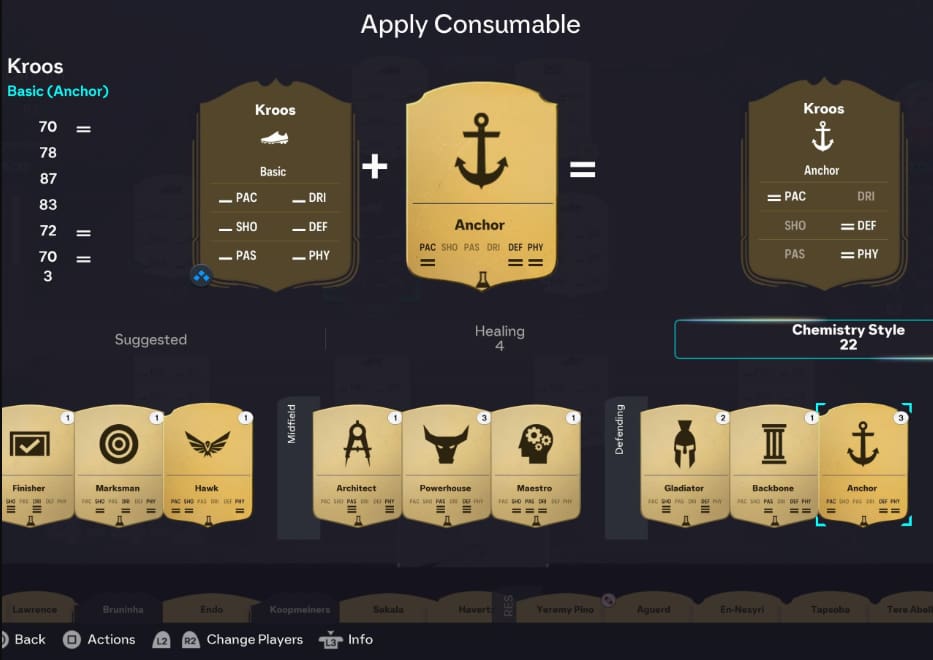
Chemistry styles are special items in FC 25 Ultimate Team that boost specific player attributes.
Think of them as performance enhancers that shift your player’s focus—turning a balanced midfielder into a defensive anchor or making a winger even more lethal in attack.
Unlike permanent upgrades, chemistry styles are consumables you apply once to a player card.
Once applied, they stay on that player unless you replace them with a different style.
Popular options include Hunter (pace and shooting), Shadow (pace and defending), and Engine (pace and dribbling).
The key benefit? You’re optimizing players to fit your tactics without spending coins on entirely new cards.
How to Buy Chemistry Styles in FC 25
Buying chemistry styles is straightforward once you know where to look. Here’s the step-by-step process:
- Step 1: Open the Transfer Market
From the Ultimate Team main menu, navigate to the Transfers tab and select Transfer Market. This is your hub for buying and selling all tradeable items, including chemistry styles.
- Step 2: Navigate to Consumables
Once inside the transfer market, you’ll see several categories. Press the right bumper (RB on Xbox, R1 on PlayStation) to cycle through tabs until you reach Consumables. This section includes contracts, fitness items, position modifiers, and chemistry styles.
- Step 3: Search for Your Desired Chemistry Style
Use the search filters to narrow down your options:
- Quality: Choose between Bronze, Silver, Gold, or Rare
- Chemistry Style Type: Select the specific style you need (Hunter, Shadow, Catalyst, etc.)
- Price Range: Set your maximum bid or Buy Now price
After applying filters, you’ll see all available listings that match your criteria.
- Step 4: Purchase the Item
You can either:
- Bid: Place a bid lower than the Buy Now price and wait for the auction to end
- Buy Now: Pay the listed price and receive the item immediately
For popular styles like Shadow or Hunter, buying now is often necessary since competition is fierce.
Chemistry Style Prices: What to Expect
| Chemistry Style | Typical Price Range (Coins) | Best Use |
|---|---|---|
| Hunter | 4,000 – 6,000 | Strikers, Wingers |
| Shadow | 5,000 – 7,000 | Full-backs, Center-backs |
| Engine | 3,000 – 4,500 | Central Midfielders |
| Catalyst | 2,500 – 4,000 | Playmakers, CAMs |
| Anchor | 1,500 – 2,500 | CDMs, CBs |
Prices fluctuate based on demand, weekend league cycles, and new promotional content. Hunter and Shadow consistently command premium prices because pace is king in FC 25.
How to Apply Consumables in FC 26
Once you’ve purchased your chemistry style, applying it is simple:
- Go to the Club section from the Ultimate Team menu
- Select Squad and choose the player you want to upgrade
- Press X (PlayStation) or A (Xbox) to view player actions
- Select Apply Consumable
- Choose your chemistry style from the list
The chemistry style will immediately update on the player card, showing the new stat boosts in green.
Important Note About Chemistry Styles in FC 26
If you’re planning ahead for FC 26, the process will likely remain similar.
EA typically maintains consistency in menu navigation and consumable application across annual releases.
However, always check for any UI updates when the new game launches.
How to Buy Consumables in FC 26 Efficiently
When FC 26 drops, use these strategies to stock up on consumables early:
- Web App Access: Use the EA Sports FC Web App or Companion App to snipe deals while away from your console
- Off-Peak Hours: Shop during weekday mornings when fewer players are online
- Mass Bidding: Place bids on multiple items simultaneously to increase your chances
The transfer market is most competitive during weekend league and right after new content releases.
Expert Insight: Using Futbin for Market Research
Before buying any chemistry style, check Futbin—the community-driven database that tracks player prices, chemistry style costs, and market trends.
Here’s why Futbin matters:
- Real-Time Prices: See current market values to avoid overpaying
- Price Graphs: Identify the best times to buy based on historical data
- Player Chemistry: Preview how different chemistry styles affect specific player stats
For example, if you’re considering a Hunter on your new striker, Futbin shows exactly which stats get boosted and whether that particular player benefits more from an Engine or Marksman instead.
Pro tip: Futbin’s mobile app lets you monitor prices on the go, giving you an edge when good deals appear.
How to Sell Chemistry Styles in FC 26
If you pack chemistry styles or want to flip them for profit, selling is equally straightforward:
- Go to Club and select Consumables
- Choose the chemistry style you want to sell
- Press List on Transfer Market
- Set your starting price and Buy Now price
- Choose auction duration (1 hour, 3 hours, 6 hours, 12 hours, or 1 day)
Pricing Strategy: Check current market rates on Futbin first.
List your Buy Now price 100-200 coins below the lowest current listing to ensure a quick sale, or price competitively and wait for the market to rise.
Popular styles like Shadow and Hunter sell almost instantly if priced fairly.
Common Mistakes When Buying Chemistry Styles
- Overpaying During Peak Hours
Weekend league Thursday evenings see massive price spikes. If possible, wait until Monday or Tuesday when casual players have moved on and supply increases.
- Ignoring Alternative Chemistry Styles
Don’t default to Hunter on every attacker. A Hawk or Finisher might provide better all-around boosts depending on your player’s base stats. Use Futbin to compare before buying.
- Not Checking Player Chemistry Requirements
Chemistry styles work best when your player already has good chemistry (at least 2 out of 3 chemistry points). Don’t waste a 5,000-coin Shadow on a player sitting at zero chemistry—fix the chemistry system first through squad building.
[image]
Frequently Asked Questions
- Can you use chemistry styles in all FC 25 game modes?
No, chemistry styles only work in Ultimate Team. They don’t apply in Career Mode, Kick-Off, or Online Seasons.
- Do chemistry styles expire or disappear?
Once applied, chemistry styles stay on a player permanently unless you replace them with a different style. They don’t wear off like contracts used to.
- What’s the difference between basic chemistry styles and special ones?
Basic chemistry provides balanced boosts across all attributes. Special chemistry styles (Hunter, Shadow, etc.) give larger boosts to specific stat categories while ignoring others.
- Can I remove a chemistry style without replacing it?
No, you can’t revert a player to Basic chemistry once a style is applied. You can only replace it with another chemistry style consumable.
- Are chemistry styles tradeable?
Yes, chemistry style consumables are tradeable on the transfer market. Once applied to a player, however, they become part of that card and can’t be removed or sold separately.
Final Thoughts
Buying chemistry style consumables in FC 25 isn’t complicated once you understand the transfer market navigation.
Head to the Consumables tab, filter for the style you need, and make your purchase.
The real skill comes in timing your buys, using tools like Futbin for market research, and applying the right styles to complement your tactics.
Whether you’re boosting a budget beast with a Hunter or adding Shadow to your newly packed defender, chemistry styles remain one of the most cost-effective ways to upgrade your Ultimate Team.
Smart shopping can save you thousands of coins over a season—and those savings add up to better players down the line.
Also Check:
About the Author