If you’ve been searching for working wallhack commands in CS2, you’re probably frustrated.
Most CS:GO commands stopped working when Counter-Strike 2 launched, and finding accurate information isn’t easy.
The good news? Valve brought back some developer commands for private servers.
You can’t use them in Premier or Competitive modes, but they’re perfect for practicing map knowledge, studying angles, and understanding common positions.
Let me show you exactly how to set this up.
How to Enable Wallhack in CS2
Enabling the Developer Console
Before you can use any commands, you need access to CS2’s developer console.
Here’s how to enable it:
- Open CS2 and go to Settings
- Click on Game settings
- Find Enable Developer Console and set it to Yes
- Bind a key to open the console (most players use the tilde key: ~)
Once that’s done, you can press your console key and start entering commands.
The sv_cheats Command: Your Starting Point
Every cheat command in CS2 requires sv_cheats to be enabled first. This is Valve’s way of keeping these tools locked to practice environments.
Type this in your console:
sv_cheats 1Or use the newer syntax:
sv_cheats trueBoth work the same way. You’ll need to enter this every time you start a private match or offline server.
Important reminder: These commands only work when you’re hosting a private server or playing offline with bots. They won’t function in any official matchmaking mode, and you won’t receive a VAC ban for using them in private matches.
Working Wallhack Commands in CS2
Valve changed how visual debugging works in CS2. Here are the two main methods that actually work.
Method 1: Entity Simulation Display
This is the simpler approach, but it has drawbacks:
sv_cheats true
cl_draw_simulating_entities true
What you’ll see:
- Box-style ESP around players
- Debug information cluttering your screen
- Additional boxes for various entities
The main problem? Your screen fills with debug text and visual noise.
It shows you where players are, but all the extra information makes it hard to focus.
You’re not getting clean player outlines—you’re getting a developer’s debugging view.
Method 2: Skeleton Display (Recommended)
This method takes a few more steps but gives cleaner results:
Step 1: Find your player ID
ent_text PLAYERLook at the number displayed at the very top of the information shown.
Step 2: Clear that text
ent_clear_debug_overlaysStep 3: Enable skeleton display for all players
ent_skeleton PLAYERStep 4: Remove your own skeleton from view
ent_skeleton [NUMBER]Replace [NUMBER] with the ID you saw in Step 1.
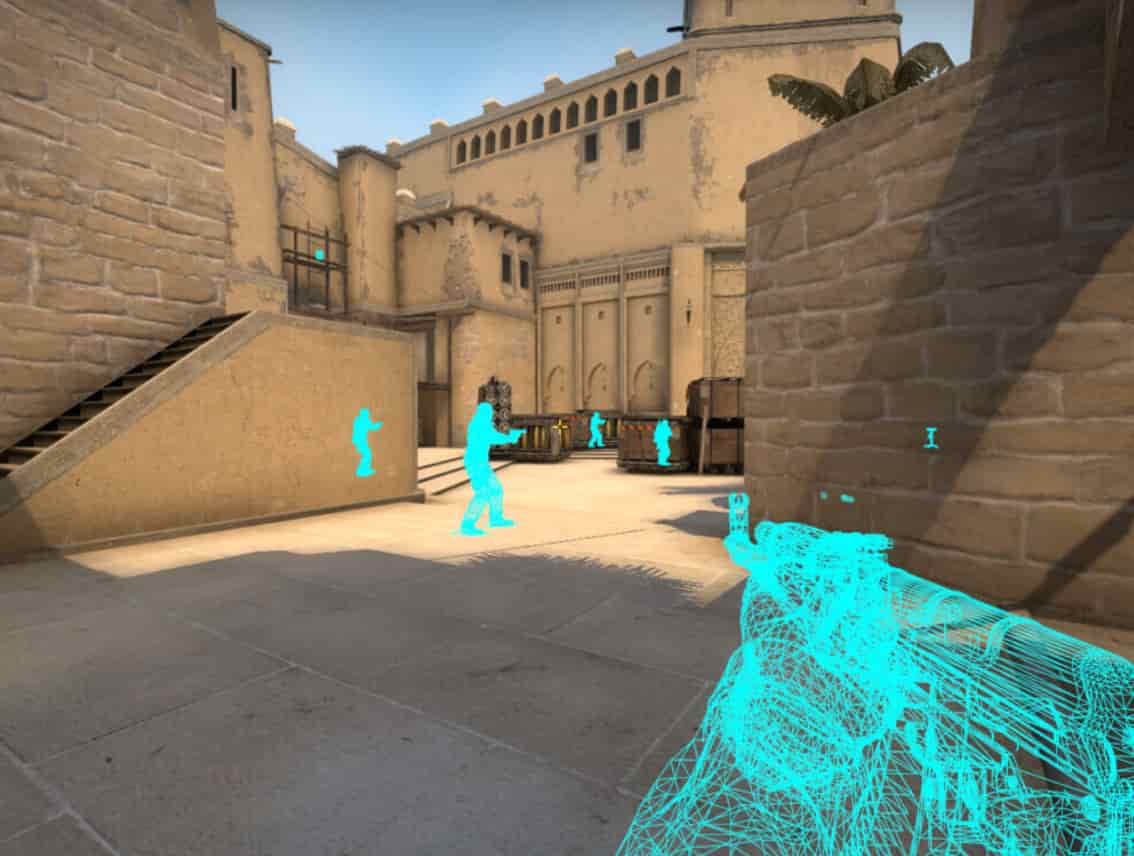
The result? You’ll see player skeletons through walls—much cleaner than Method 1.
Dealing with Dead Bodies
One annoying issue: dead players’ skeletons remain standing, which confuses.
Fix it with this command:
cl_ent_skeleton c_cs_player_for_precacheThis makes skeletons fall when players die. However, you won’t be able to remove your own skeleton when using this variant.
For most practice scenarios, the standing dead bodies command works better because you can hide your own skeleton.
Turning Wallhack Off
When you’re done practicing, disable the skeleton display:
ent_clear_debug_overlaysOr simply restart your server.
| Command | Function | Drawback |
|---|---|---|
| cl_draw_simulating_entities true | Box ESP with debug info | Screen clutter, hard to focus |
| ent_skeleton PLAYER | Clean skeleton display | Dead bodies stand upright |
| cl_ent_skeleton c_cs_player_for_precache | Skeletons fall when dead | Can’t hide your own skeleton |
Other Useful CS2 Cheat Commands
Once sv_cheats is enabled, you have access to other practice commands:
Infinite ammo:
sv_infinite_ammo 1No clipping (fly through walls):
noclipGod mode:
godRestart round:
mp_restartgame 1Bot commands:
bot_stop 1
bot_place
These help you set up specific practice scenarios without constantly reloading.
Why Use Wallhacks for Practice?
You might wonder why anyone would use wallhacks legitimately. Here’s the thing: understanding common positions is crucial for improving at CS2.
When you use these commands in private matches, you can:
- Study default positions for each map and site
- Learn common boost spots and off-angles
- Understand rotation timings by watching bot movements
- Practice pre-firing specific angles where enemies typically hold
- Memorize smoke and flash timings while seeing their effect on positioned players
Professional players didn’t learn every angle by accident.
They studied the game deeply. These tools let you do the same without spending hundreds of hours getting picked from spots you didn’t know existed.
Expert Insight: The Right Way to Practice
Using wallhacks to win fights against friends is pointless and honestly just ruins the fun. But using them to understand the game? That’s different.
I’ve seen players stuck in the same rank for months suddenly improve after spending a few hours in private servers studying common holds. They weren’t getting better aim—they were gaining game sense.
Here’s a smart practice routine:
- Load a competitive map with bots
- Enable skeleton wallhack using Method 2
- Play 5 rounds and watch where the bots position themselves
- Note the patterns—certain spots appear repeatedly
- Disable wallhack and play 5 more rounds
- Pre-aim those positions you just learned
You’ll notice your reaction time seems faster. It’s not—you’re just already aiming where enemies actually are.
The goal isn’t to depend on wallhacks. It’s to internalize map knowledge so well that you don’t need them.
Common Issues and Fixes
Problem: Commands aren’t working
- Make sure sv_cheats is enabled first
- Verify you’re in a private match or offline with bots
- Try restarting CS2 and re-enabling the console
Problem: r_drawothermodels 2 not working
- This CS:GO command was removed in CS2
- Use the skeleton method instead
- Valve intentionally changed the command structure
Problem: Too much visual clutter
- Switch from Method 1 to Method 2
- Use ent_clear_debug_overlays to reset
- Restart your server for a clean slate
Problem: Can’t remove my own skeleton
- This happens with cl_ent_skeleton c_cs_player_for_precache
- Use the standard ent_skeleton method instead
- Accept seeing your skeleton as a trade-off for dead bodies falling
The Ethics of Cheat Commands
Let’s be direct: using any form of wallhack in competitive matches is cheating.
It’s unfair, it’s against the rules, and it ruins the game for everyone else.
These commands exist for legitimate practice purposes.
Valve included them specifically so players could learn maps, test smokes, and study the game in private environments.
If you’re tempted to find third-party cheats for competitive matches, don’t.
You’ll get VAC banned, lose your account, and honestly, where’s the satisfaction? Winning because of the skill you developed feels completely different than winning because you saw through walls.
Spend the time practicing properly.
Use these commands to learn, then prove what you learned in real matches.
FAQ
- Can I get VAC banned for using these commands?
No. These are official Valve commands that only work in private servers. You cannot receive a VAC ban for using developer commands in offline or private matches.
- Do these wallhack commands work in competitive mode?
No. You need sv_cheats enabled, which is impossible in any official matchmaking mode, including Premier, Competitive, and Wingman.
- Why doesn’t r_drawothermodels 2 work anymore?
Valve removed this CS:GO command when CS2 launched. The new engine uses different visual debugging systems, which is why the skeleton method is now the standard approach.
- Will these commands work in community servers?
Only if the server administrator has enabled sv_cheats. Most community competitive servers keep cheats disabled. These commands are meant for private practice servers you host yourself.
- Can other players see when I’m using wallhacks in a private match?
If you’re hosting a private match with friends and enable sv_cheats, anyone on the server can use the same commands. The server host controls whether cheats are enabled, not individual players.
Final Thoughts
CS2’s wallhack commands aren’t what they used to be in CS:GO, but the skeleton method gives you a clean way to study the game in private matches.
Use them to accelerate your learning, not as a crutch.
Real improvement comes from understanding why players hold certain positions, not just knowing where they are.
These commands help you learn faster, but translating that knowledge into actual match performance still requires practice and skill.
Load up a private server, spend 30 minutes studying common positions on your weakest map, then take that knowledge into competitive matches.
You’ll notice the difference immediately.
Also Check:
About the Author