Alexandra “twenty3” Timonina stands among elite female CS2 competitors worldwide.
Her journey with Imperial Valkyries reshaped women’s Counter-Strike history.
She dominated ESL Impact tournaments repeatedly. Her team crushed opponents at major events.
Fans now hunt for her exact settings to mirror her playstyle.
twenty3 competed at IEM Katowice 2025 and PGL Cluj-Napoca 2025. These weren’t small tournaments.
They were Tier 1 LANs where she proved herself against top competition. Her performance inspired thousands of aspiring players.
Twenty3 CS2 Settings
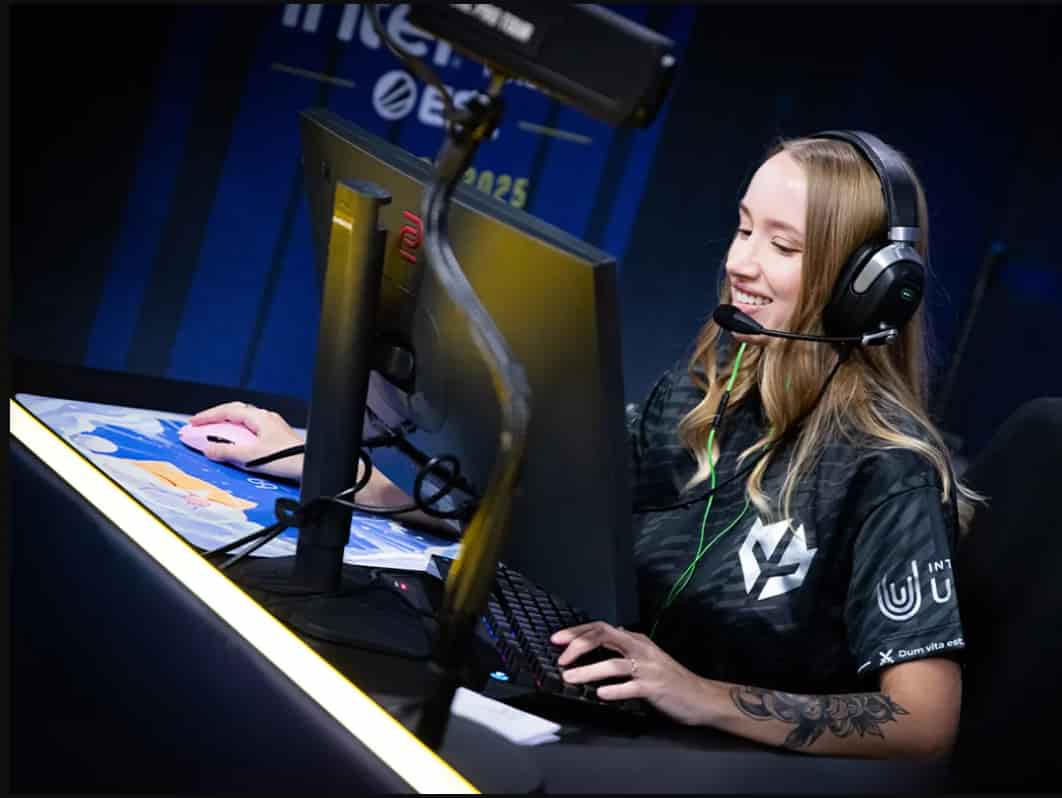
Twenty3 CS2 Settings
Quick Summary Box:
- Current Team: Pigeons
- eDPI: 840 (400 DPI × 2.1 sensitivity)
- Resolution: 1280×960 (4:3 Stretched)
- Crosshair: Small cyan dot
- Primary Mouse: VAXEE XE Wireless Pink
Key Highlights
- Standard rifler sensitivity is perfectly balanced for precision
- Classic 4:3 stretched resolution for better enemy visibility
- Minimal crosshair design enables accurate headshot placement
- Default viewmodel settings align with CS2 restrictions
- Professional-grade VAXEE peripherals built for competitive play
twenty3 Mouse Configuration
Her mouse setup shows no extreme choices. The twenty3 cs2 settings reveal a calculated approach to aim mechanics.
She uses 400 DPI paired with 2.1 in-game sensitivity. This creates an effective DPI of 840. Most professional riflers operate within this range. It balances flick potential with tracking stability.
| Setting | Value |
|---|---|
| Mouse | VAXEE XE Wireless Pink |
| DPI | 400 |
| Sensitivity | 2.1 |
| eDPI | 840 |
| Zoom Sensitivity | 1 |
| Polling Rate (Hz) | 1000 |
| Windows Sensitivity | 6 |
Her polling rate sits at 1000Hz. This ensures maximum input responsiveness. Windows sensitivity stays at the standard 6/11 position. Never alter Windows sensitivity when playing CS2.
Crosshair Setup Analysis
The twenty3 cs2 steam profile shows she favors minimal visual obstruction. Her crosshair resembles a tiny cyan dot.
- Crosshair Import Code: CSGO-49XFS-jKmRq-795tj-xp4XH-ed9aC
Copy this code into your game console. Navigate to settings and paste it. Your crosshair will instantly match hers.
| Parameter | Configuration |
|---|---|
| Style | Classic Static |
| Length | 1 |
| Thickness | 1 |
| Gap | -5 |
| Outline | No |
| Color | Cyan |
| Center Dot | No |
The negative gap value creates that signature dot appearance. Static style means no movement during firing. This maintains a consistent aim reference.
Viewmodel Configuration
CS2 restricts viewmodel customization on official servers. twenty3 accepts these limitations and uses default positioning.
Console Commands:
viewmodel_fov 68
viewmodel_offset_x 2.5
viewmodel_offset_y 0
viewmodel_offset_z -1.5
viewmodel_presetpos 2
These represent preset position 2. Most professionals stick with defaults now. The game’s competitive integrity changes eliminated extreme viewmodel manipulation.
- FOV: 68 (maximum allowed)
- X Offset: 2.5 (centered positioning)
- Y Offset: 0 (no forward/backward adjustment)
- Z Offset: -1.5 (slight lowering)
Video Settings Breakdown
She runs 1280×960 resolution in 4:3 stretched mode. This technique enlarges player models horizontally. Enemies appear wider and easier to spot.
Brightness sits at 93%. High brightness reveals enemies in darker corners. Fullscreen mode eliminates input lag compared to the borderless window.
| Setting | Value |
|---|---|
| Resolution | 1280×960 |
| Aspect Ratio | 4:3 |
| Scaling Mode | Stretched |
| Brightness | 93% |
| Display Mode | Fullscreen |
Lower resolution boosts FPS significantly. More frames create smoother gameplay. Her monitor refreshes at 240Hz. Higher FPS utilizes that capability fully.
Launch Options Explained
Her launch parameters optimize game performance:
-freq 240 -novid -tickrate 128 +mat_disable_fancy_blending 1 +fps_max 400 +cl_updaterate 128 +cl_cmdrate 128 -allow_third_party_software
Parameter Breakdown:
-freq 240: Forces 240Hz refresh rate-novid: Skips intro videos-tickrate 128: Sets practice server tickrate+fps_max 400: Caps framerate at 400+cl_updaterate 128: Network update frequency+cl_cmdrate 128: Command send rate-allow_third_party_software: Permits analytics tools
Professional Equipment Setup
Hardware matters in competitive gaming. The twenty3 cs2 stats improve partly through quality peripherals.
| Component | Product |
|---|---|
| Mouse | VAXEE XE Wireless Pink |
| Mousepad | VAXEE PA PSweet |
| Monitor | ZOWIE XL2546K |
| Keyboard | Logitech G Pro X |
| Headset | HyperX Cloud II |
VAXEE produces lightweight wireless mice. The XE model weighs under 70 grams. Reduced weight enables faster movements during clutch situations.
The ZOWIE XL2546K offers 240Hz native refresh rate. DyAc+ technology reduces motion blur. Competitive players swear by this monitor.
Settings Comparison: Top Female Players
Understanding how twenty3 stacks against peers provides context. Here’s how her config compares to other top female competitors.
| Player | eDPI | Resolution | Crosshair Style |
|---|---|---|---|
| twenty3 | 840 | 1280×960 (4:3) | Small cyan dot |
| ANa | 880 | 1280×960 (4:3) | Classic cross |
| Fenom | 760 | 1920×1080 (16:9) | Static cross |
| Donk | 1040 | 1280×960 (4:3) | Dynamic dot |
She lands in the middle sensitivity range. Not too fast, not sluggish. The donk CS2 settings show higher eDPI for aggressive entry fragging.
The ANa cs2 settings closely mirror twenty-three’s approach. The fenom cs2 settings demonstrate that native resolution works at pro level too.
Expert Analysis: Why These Settings Work
- Her configuration prioritizes consistency over flash. The 840 eDPI allows precise angle holding while maintaining flick capability.
- 4:3 stretched remains popular because it works. Player models appear larger. Your brain processes visual information faster. Headshots become more intuitive.
- The minimal crosshair eliminates screen clutter. You see more of the game environment. Your focus stays on enemy positioning rather than crosshair design.
- Default viewmodel acceptance shows adaptability. When Valve changed the rules, she adapted immediately. This mental flexibility separates good players from great ones.
- Her brightness setting deserves attention. At 93%, shadows reveal hidden opponents. Competitive advantage lives in these small details.
Career Journey and Team History
Alexandra “twenty3” Timonina was born May 31st, 2001. She’s currently 24 years old. Her Russian roots shaped her aggressive yet disciplined playstyle.
Team Timeline:
- Imperial Valkyries (dominant era)
- Nigma Galaxy (transition period)
- Galaxy Racer Female (brief stint)
- Pigeons (current team)
Imperial Valkyries represented her peak. That roster demolished ESL Impact competition repeatedly. They set records that still stand today.
Her boyfriend’s identity remains private. She keeps personal life separate from professional gaming. The twenty3 cs2 boyfriend searches yield no confirmed information.
Streaming and Community Presence
- She streams regularly on Twitch. Fans watch her grind FaceIt matches and scrims.
- Her stream provides real-time insight into decision-making processes.
- The twenty3 steam profile shows thousands of CS2 hours.
- This dedication builds muscle memory and game sense. You can’t shortcut experience.
- She engages with chat during downtime. Questions get answered.
- Tips get shared. This accessibility builds loyal fanbases.
Practical Takeaways for Your Game
Don’t blindly copy pro settings. Understand the reasoning behind choices. Then adapt to your strengths.
Action Steps:
- Test her eDPI range (800-900)
- Try 4:3 stretched for one week
- Experiment with minimal crosshairs
- Cap your FPS above your refresh rate
- Use fullscreen mode exclusively
- Adjust brightness to 90-95%
Settings provide a foundation. Practice builds skill. Review your demos. Identify mistakes. Fix them systematically.
Unknown Configuration Elements
Some aspects of her setup remain undocumented. Advanced video settings aren’t publicly available. HUD and radar preferences stay mysterious.
Unknown Settings:
- NVIDIA Reflex status
- Shadow quality preferences
- Anti-aliasing choices
- HUD scale and color
- Radar zoom and rotation settings
These might surface in future interviews or stream captures. Check back for updates as new information emerges.
Frequently Asked Questions
- What’s twenty3’s real name?
Her real name is Alexandra Timonina. She adopted the twenty3 tag early in her competitive career and it stuck throughout her rise to prominence.
- How old is twenty3?
twenty3 was born on May 31st, 2001. This makes her 24 years old. She’s in her prime competitive years with experience balancing youthful reflexes.
- What team does twenty3 play for now?
She currently represents Pigeons in competitive CS2. Before this, she played for Imperial Valkyries, Nigma Galaxy, and Galaxy Racer Female during different career phases.
- What sensitivity does twenty3 use?
She uses 400 DPI combined with 2.1 in-game sensitivity. This creates an effective DPI of 840, placing her solidly in the average range for professional riflers.
- Where can I find twenty3’s crosshair code?
Her current crosshair code is CSGO-49XFS-jKmRq-795tj-xp4XH-ed9aC. Paste this into your console to import her exact crosshair settings instantly.
Final Thoughts:
twenty3’s settings reflect years of refinement. Nothing flashy. Nothing excessive. Just proven configurations that enhance performance.
Her 840 eDPI balances all engagement ranges. The 4:3 stretched resolution maximizes target acquisition. Minimal crosshair design maintains focus where it matters.
Copy her settings if you want. But remember that settings alone won’t make you pro. Dedication, practice, and smart play create results. Settings just remove obstacles between your brain and the game.
Start with her config as a baseline. Adjust based on what feels natural. Record your matches. Study your gameplay. Improvement comes from honest self-assessment and deliberate practice.
Alexandra “twenty3” Timonina proved that women belong at Tier 1 events. Her settings helped get her there. Now they can help you climb ranks too.
Also Check:
About the Author