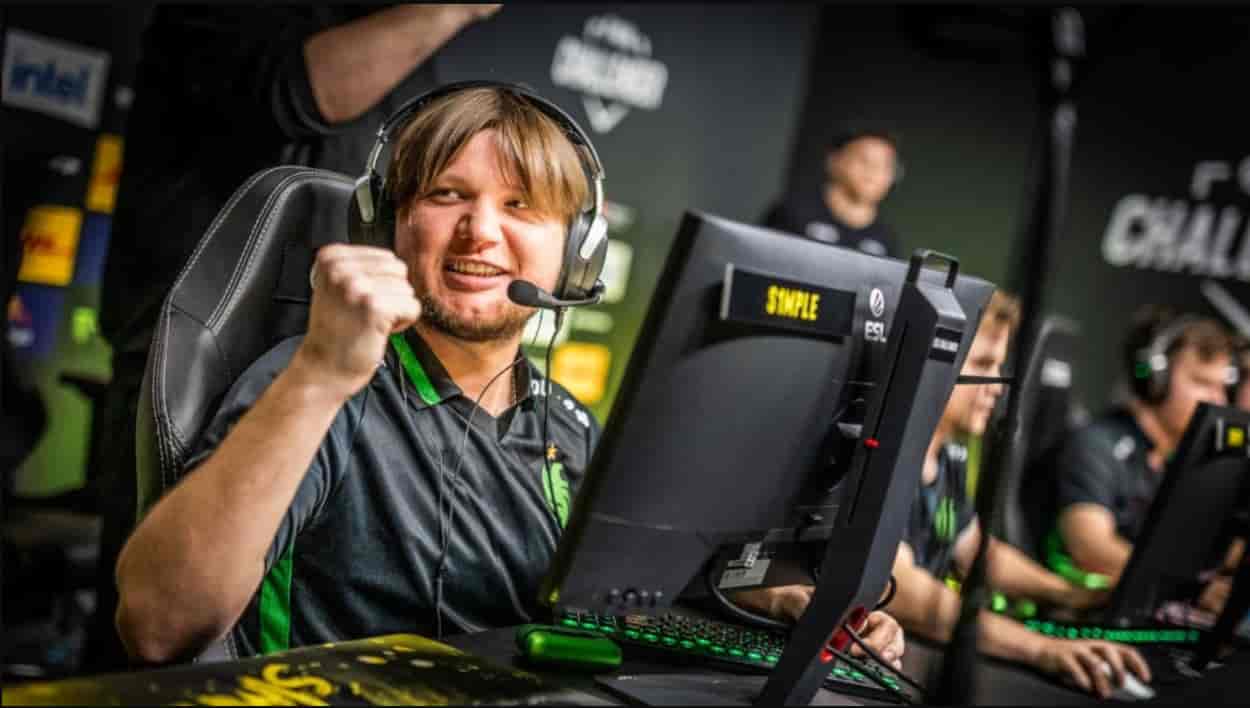
Oleksandr “s1mple” Kostyliev stands as one of the most mechanically dominant players in Counter-Strike history.
His legendary AWP flicks, precise rifling, and aggressive playstyle have been refined through years of elite competition, making his settings a valuable reference point for aspiring players.
s1mple CS2 Settings
Why s1mple’s Settings Matter
Professional configurations aren’t arbitrary—they’re the result of thousands of hours of fine-tuning at the highest competitive level. s1mple’s setup represents a carefully balanced approach between speed, precision, and visual clarity.
Competitive Evolution
Unlike casual presets, these settings have evolved continuously since his breakthrough with NAVI in 2016. Each adjustment reflects adaptation to new patches, meta shifts, and hardware improvements.
AWP-First Philosophy
As one of the game’s premier AWPers, s1mple’s configuration prioritizes quick target acquisition and flick consistency. His higher-than-average eDPI enables rapid scope adjustments without requiring extreme physical movements.
Performance Over Aesthetics
Every visual setting is optimized for competitive advantage. Lower graphics quality, stretched resolution, and minimal HUD elements ensure maximum focus during high-pressure duels.
About s1mple
Full Name: Oleksandr Kostyliev
Born: October 2, 1997 (Age 28)
Nationality: Ukrainian
Current Team: BC.Game
Previous Teams: HellRaisers, FlipSid3, Team Liquid, Natus Vincere, Falcons, FaZe Clan
s1mple is widely regarded as the greatest CS:GO player of all time, competing with ZywOo and dev1ce for this distinction. His tenure with NAVI (2016-2023) produced numerous championship victories and cemented his legacy as a generational talent.
s1mple CS2 Mouse Settings
Mouse configuration forms the foundation of aim consistency. s1mple’s settings reflect his AWP-centric playstyle with a higher eDPI than typical riflers.
| Setting | Value |
|---|---|
| Mouse | Logitech G Pro X Superlight 2 Cyan |
| DPI | 400 |
| In-Game Sensitivity | 3.09 |
| eDPI | 1,236 |
| Zoom Sensitivity | 1.00 |
| Polling Rate | 1000 Hz |
| Windows Sensitivity | 6/11 |
Understanding the eDPI
Effective DPI (eDPI) is calculated by multiplying raw DPI by in-game sensitivity. At 1,236 eDPI, s1mple sits above the average professional rifler (typically 800-1000 eDPI) but remains controlled enough for precise crosshair placement.
Why Higher Sensitivity for AWPing?
AWP gameplay demands rapid flick adjustments when scoped. Lower sensitivity would require larger arm movements to track fast-peeking opponents, potentially costing critical milliseconds. s1mple’s configuration enables quick target acquisition while maintaining sufficient control for scoped precision.
Zoom Sensitivity Explained
A zoom sensitivity of 1.00 maintains consistent eDPI when scoped. This 1:1 ratio means muscle memory transfers directly between unscoped and scoped states, eliminating the need to adjust for different sensitivity levels.
s1mple CS2 Crosshair Settings
Crosshair preference is highly individual, but s1mple’s minimalist approach emphasizes pixel-level accuracy.
| Setting | Value |
|---|---|
| Crosshair Code | CSGO-E8xcE-27Lmw-2ipNt-3HZvp-pevvE |
| Style | Legacy |
| Follow Recoil | No |
| Dot | Yes |
| Length | 1 |
| Thickness | 0 |
| Gap | -2 |
| Outline | No |
| Color | Cyan |
| Red | 50 |
| Green | 255 |
| Blue | 200 |
| Alpha | 255 |
| T Style | No |
| Deployed Weapon Gap | No |
| Sniper Width | 0 |
Design Philosophy
- Minimal Visual Footprint: The nearly invisible crosshair (thickness 0, length 1) with a central dot creates minimal screen obstruction. This design prioritizes clear sight lines over visual guidance.
- Static Recoil Handling: With “Follow Recoil” disabled, s1mple controls spray patterns through muscle memory rather than visual feedback. This approach reflects thousands of hours of spray pattern practice.
- Cyan Color Choice: High-contrast cyan remains visible against most map textures while avoiding the eye strain associated with bright colors like neon green or yellow.
How to Import
Copy the crosshair code and paste it into CS2’s crosshair settings:
CSGO-E8xcE-27Lmw-2ipNt-3HZvp-pevvEs1mple CS2 Viewmodel Settings
Viewmodel configuration affects weapon positioning on screen. s1mple uses standard professional settings that maximize visibility.
| Command | Value |
|---|---|
| FOV | 68 |
| Offset X | 2.5 |
| Offset Y | 0 |
| Offset Z | -1.5 |
| Preset Position | 2 |
Console Commands
Apply these settings via console:
viewmodel_fov 68
viewmodel_offset_x 2.5
viewmodel_offset_y 0
viewmodel_offset_z -1.5
viewmodel_presetpos 2
Why These Values?
- Standard Professional Configuration: These settings are nearly universal among pro players. The preset position 2 places weapons to the right side of the screen, minimizing obstruction during left-side peeks while maintaining weapon visibility for ammo/reload awareness.
- Maximum Visibility Priority: The FOV and offset combination ensures minimal screen real estate is occupied by the weapon model, particularly important during close-quarters engagements where every pixel of enemy visibility matters.
s1mple CS2 Launch Options
Launch options configure CS2 before the game engine initializes. s1mple’s setup prioritizes performance and removes unnecessary elements.
-freq 360 -novid -console +fps_max 999Breaking Down Each Parameter
| Option | Purpose |
|---|---|
| -freq 360 | Forces 360Hz refresh rate (matching his monitor) |
| -novid | Skips intro videos for faster startup |
| -console | Enables developer console on launch |
| +fps_max 999 | Removes FPS cap for maximum frame rate |
Why Remove FPS Caps?
Higher frame rates reduce input latency even on monitors with lower refresh rates. Running at 400+ FPS on a 360Hz monitor ensures the most recent frame is always displayed, minimizing the delay between player input and visual feedback.
s1mple CS2 Video Settings
Video configuration significantly impacts both performance and visual clarity. s1mple’s choices reflect old-school CS preferences optimized for competitive play.
| Setting | Value |
|---|---|
| Resolution | 1280×960 |
| Aspect Ratio | 4:3 |
| Scaling Mode | Stretched |
| Brightness | 110% |
| Display Mode | Fullscreen |
The 4:3 Stretched Advantage
Historical Context: Veteran CS players have used 4:3 resolutions since the early 2000s, when CRT monitors were standard. The stretched scaling mode takes a 4:3 image and stretches it to fill modern 16:9 displays.
Perceived Benefits:
- Wider enemy models: Horizontal stretching makes player models appear wider, potentially making them easier to hit
- Reduced peripheral distraction: Narrower field of view eliminates edge-of-screen movement
- Familiarity: Muscle memory developed over years of 4:3 play
Trade-offs:
- Reduced horizontal field of view compared to native 16:9
- Slight visual distortion that may disorient new users
Brightness at 110%
Elevated brightness helps spot enemies in darker map areas without compromising visual clarity in well-lit zones. This setting is particularly valuable on maps like Ancient and Anubis with significant shadow coverage.
s1mple CS2 Advanced Video Settings
Advanced graphics options balance visual fidelity with frame rate stability. s1mple’s configuration favors performance while maintaining essential visual information.
| Setting | Value |
|---|---|
| Boost Player Contrast | Disabled |
| V-Sync | Disabled |
| NVIDIA Reflex Low Latency | Disabled |
| NVIDIA G-Sync | Disabled |
| Maximum FPS In Game | 0 (Unlimited) |
| Multisampling Anti-Aliasing | 8x MSAA |
| Global Shadow Quality | High |
| Dynamic Shadows | All |
| Model / Texture Detail | Low |
| Texture Filtering Mode | Bilinear |
| Shader Detail | Low |
| Particle Detail | Low |
| Ambient Occlusion | Disabled |
| High Dynamic Range | Quality |
| FidelityFX Super Resolution | Disabled (Highest Quality) |
Critical Disabled Features
- V-Sync & NVIDIA Reflex: Both add input latency. V-Sync synchronizes frame rendering with monitor refresh, which introduces delay. While NVIDIA Reflex can reduce latency in some scenarios, s1mple keeps it disabled for consistency.
- Boost Player Contrast: This feature increases player model visibility but can introduce visual inconsistencies. s1mple relies on map knowledge and natural contrast instead.
Why 8x MSAA?
Anti-aliasing smooths jagged edges at the cost of performance. s1mple uses 8x MSAA despite other low settings because it significantly improves clarity at distance, particularly when holding long angles with the AWP. Clean edge definition helps distinguish player models from environmental geometry.
Shadow Quality: High
Shadows provide critical information about enemy positions around corners and elevation changes. High shadow quality ensures these tactical cues remain clear without sacrificing excessive frame rate.
s1mple CS2 HUD Settings
HUD configuration affects information presentation without impacting gameplay mechanics.
| Setting | Value |
|---|---|
| HUD Scale | 1.0 (Default) |
| HUD Color | Light Blue |
Minimalist Approach
Default HUD scale provides optimal information density without overwhelming the screen. Light blue offers good contrast against most map textures while remaining non-intrusive during intense firefights.
s1mple CS2 Radar Settings
Radar configuration is crucial for map awareness and team coordination.
| Setting | Value |
|---|---|
| Radar Centers The Player | Yes |
| Radar is Rotating | Yes |
| Toggle Shape With Scoreboard | Yes |
| Radar Hud Size | 1.0 |
| Radar Map Zoom | 0.7 |
Why Centered and Rotating?
- Centered radar keeps your position fixed in the middle, making it easier to process teammate and enemy positions relative to yourself. This is especially valuable during fast rotations when spatial awareness is critical.
- Rotating radar maintains orientation consistency—the top of the radar always represents your current facing direction. This eliminates mental translation between radar and in-game perspective.
Zoom Level: 0.7
Moderate zoom provides a balance between detail and map coverage. Too much zoom creates tunnel vision; too little makes it difficult to identify specific locations. 0.7 shows enough context for tactical decisions while maintaining readability.
s1mple CS2 Gear and Equipment
Professional peripherals complement optimized settings. s1mple’s hardware selection emphasizes lightweight design and proven reliability.
| Device | Model |
|---|---|
| Mouse | Logitech G Pro X Superlight 2 Cyan |
| Mousepad | SteelSeries QcK Performance Speed |
| Monitor | ZOWIE XL2586X+ (360Hz) |
| Keyboard | Logitech G715 (GX Brown Tactile) |
| Headset | Logitech G PRO X 2 White |
Mouse: Logitech G Pro X Superlight 2
At just 60 grams, this wireless mouse eliminates cable drag while maintaining tournament-grade sensor performance. The symmetrical design accommodates various grip styles, and the 32,000 DPI sensor provides precise tracking at s1mple’s preferred 400 DPI setting.
Monitor: ZOWIE XL2586X+
This 360Hz monitor matches s1mple’s -freq 360 launch option. High refresh rate reduces motion blur and provides smoother visual feedback during rapid crosshair movements. The 24.5″ size is standard for competitive FPS gaming, offering optimal viewing distance without excessive head movement.
Keyboard: Logitech G715
The GX Brown tactile switches provide tactile feedback without the loud click of blue switches. This balance suits competitive environments where audio cues are critical and mechanical noise could interfere with game sound.
Mousepad: SteelSeries QcK Performance Speed
Large surface area (450mm x 400mm) accommodates low-sensitivity arm aiming while the smooth cloth surface enables consistent glide. The “Speed” designation indicates lower friction compared to control-oriented mousepads, complementing s1mple’s flick-heavy playstyle.
Understanding s1mple’s Configuration Philosophy
Consistency Over Comfort
s1mple’s settings prioritize repeatable muscle memory rather than ergonomic convenience. The 4:3 stretched resolution, minimalist crosshair, and specific viewmodel positioning create a consistent visual environment across all maps and scenarios.
Performance Above Visual Fidelity
Low texture details, minimal particle effects, and disabled ambient features maximize frame rate stability. In competitive CS2, visual consistency matters more than graphical impressiveness—stuttering or FPS drops during crucial duels can cost rounds.
AWP-Optimized Sensitivity
The 1,236 eDPI reflects s1mple’s primary role. Riflers often use lower sensitivity (800-1000 eDPI) for precise spray control, while AWPers benefit from faster target acquisition for flick shots. This sensitivity enables rapid scope adjustments without sacrificing scoped precision.
Information Over Aesthetics
Every setting serves a functional purpose. Stretched resolution widens enemy models, high shadow quality reveals position information, and centered radar simplifies spatial awareness. No choice is made for aesthetic reasons alone.
Should You Copy s1mple’s Settings?
The Value of Professional References
s1mple’s configuration provides a proven baseline, particularly for players developing their AWP skills. His settings demonstrate how elite players balance competing demands: speed versus control, information versus distraction, performance versus visuals.
Individual Customization Required
- Hardware Differences: s1mple uses a 360Hz monitor, Superlight 2 mouse, and high-end PC. Your hardware may require different settings for optimal performance.
- Playstyle Variation: Riflers, entry fraggers, and support players have different needs. An aggressive entry player might prefer higher sensitivity than s1mple’s AWP-focused setup.
- Physical Factors: Arm length, desk height, mousepad size, and grip style all influence ideal sensitivity. A setting comfortable for s1mple’s physical setup may feel awkward for yours.
The Experimentation Process
- Start with the baseline: Import s1mple’s settings as a starting point.
- Test in practice: Spend several hours in deathmatch and aim training before making judgments.
- Adjust incrementally: Change one variable at a time to understand its impact.
- Trust the process: Building muscle memory takes time—don’t abandon settings after one poor session.
Key Takeaways
s1mple’s CS2 settings reflect years of competitive refinement at the highest level. The configuration prioritizes AWP effectiveness, visual clarity, and performance stability over graphical fidelity.
Core Principles:
- Higher eDPI (1,236) enables AWP flicks while maintaining control
- 4:3 stretched resolution creates wider enemy models
- Minimal crosshair emphasizes precision over visual guidance
- Low graphics settings maximize frame rate consistency
- High shadow quality preserves tactical information
- Centered, rotating radar simplifies map awareness
Using These Settings Effectively:
- Treat them as a reference point, not a rigid template
- Adjust for your hardware, playstyle, and physical setup
- Invest time building muscle memory before changing variables
- Focus on consistent practice over frequent setting adjustments
Understanding why elite players make specific configuration choices helps you make informed decisions about your own setup. s1mple’s settings work for him because they align with his playstyle, hardware, and thousands of hours of practice—your ideal configuration may differ, but his choices provide valuable insight into competitive CS2 optimization.
Frequently Asked Questions
- What is s1mple’s real name?
Oleksandr Kostyliev.
- How old is s1mple?
Born October 2, 1997, s1mple is currently 28 years old.
- Where is s1mple from?
Ukraine.
- What team does s1mple play for?
s1mple currently plays for BC.Game after leaving FaZe Clan.
- What was s1mple’s most successful team?
Natus Vincere (NAVI), where he played from 2016-2023 and achieved legendary status.
- Does s1mple stream on Twitch?
Yes, s1mple streams regularly on Twitch.
- What sensitivity does s1mple use?
400 DPI with 3.09 in-game sensitivity (1,236 eDPI).
- What resolution does s1mple play on?
1280×960 in 4:3 stretched mode.
- What mouse does s1mple use?
Logitech G Pro X Superlight 2 Cyan.
- What is s1mple’s crosshair code?
CSGO-E8xcE-27Lmw-2ipNt-3HZvp-pevvE
- Why does s1mple use 4:3 stretched?
It widens enemy models, reduces peripheral distraction, and maintains consistency with years of muscle memory from CS:GO and earlier versions.
- Is s1mple’s sensitivity good for beginners?
His 1,236 eDPI is higher than average and optimized for AWP play. Beginners might benefit from starting lower (800-1000 eDPI) when learning spray control and crosshair placement.
Also Check:
About the Author