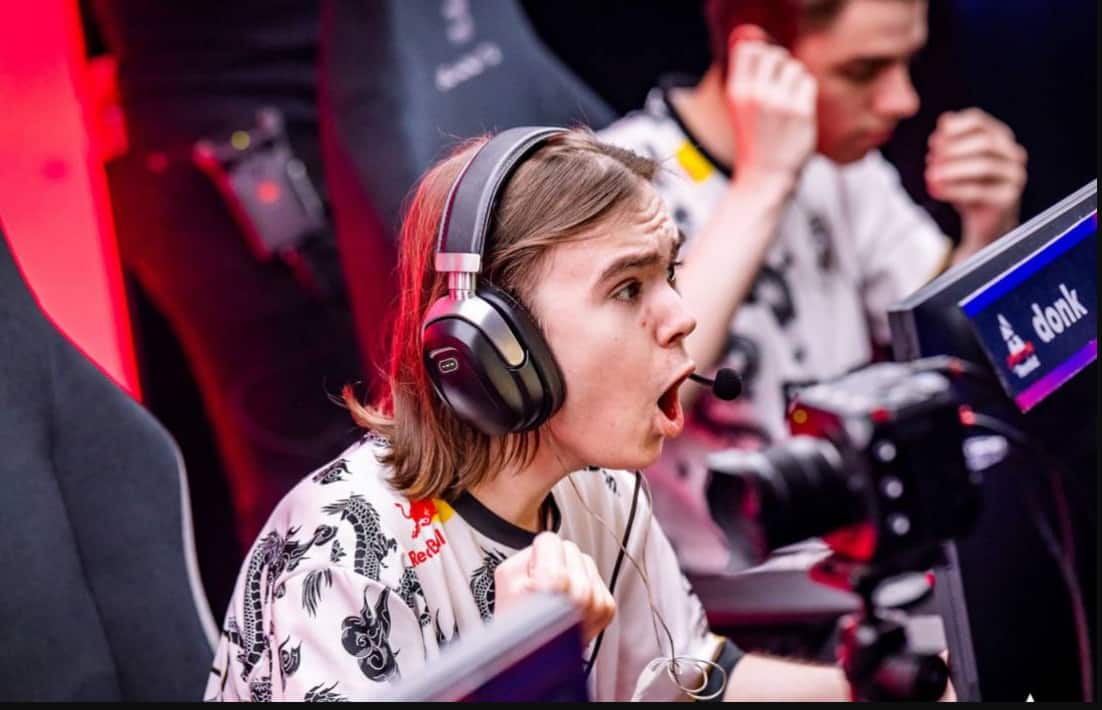
Danil “donk” Kryshkovets has rapidly established himself as one of the most electrifying players in Counter-Strike 2.
Since bursting onto the professional scene in early 2024 with Team Spirit’s victory at IEM Katowice, this 19-year-old Russian rifler has consistently demonstrated why he’s considered a generational talent in esports.
What separates donk from his peers isn’t just raw mechanical skill—though he has that in abundance.
It’s his fearless, aggressive playstyle combined with best-in-class aim and game sense that makes him a nightmare for opponents.
With over 17,000 hours invested in Counter-Strike according to his Steam profile, donk’s settings have been refined through countless hours of practice and competition.
This comprehensive guide breaks down every aspect of donk’s CS2 configuration, from his mouse sensitivity and crosshair setup to his video settings and professional gear.
Whether you’re looking to replicate his setup or simply understand what makes a pro player tick, this guide provides all the details you need.
Donk CS2 Settings
Donk CS2 Mouse Settings: Precision Meets Aggression
Overview
Mouse settings form the foundation of any competitive CS2 player’s setup, and donk’s configuration reflects a carefully balanced approach that supports his aggressive entry-fragging style while maintaining the precision necessary for clutch situations.
Complete Mouse Configuration
| Setting | Value |
|---|---|
| Mouse | ZOWIE x donk (Unreleased) |
| DPI | 800 |
| In-Game Sensitivity | 1.25 |
| eDPI | 1000 |
| Zoom Sensitivity | 1 |
| Polling Rate | 1000 Hz |
| Windows Sensitivity | 4 |
Understanding the eDPI
With an effective DPI (eDPI) of 1000, donk sits in the sweet spot for modern riflers. His eDPI is calculated by multiplying his mouse DPI (800) by his in-game sensitivity (1.25). This places him slightly above the typical professional average, which hovers around 800-900 eDPI.
Why 1000 eDPI Works for donk:
- Aggressive Flicks: The slightly higher sensitivity allows for faster reaction shots and quick 180-degree turns during entry fragging
- Tracking Stability: Still low enough to maintain precise tracking on moving targets
- Muscle Memory Consistency: After 17,000+ hours, donk has developed extraordinary muscle memory at this exact sensitivity
- Multi-Kill Potential: Enables rapid target acquisition when facing multiple opponents in quick succession
The Importance of Consistency
At the professional level, even minor sensitivity changes can disrupt years of built-up muscle memory. donk’s settings have remained remarkably stable over time, demonstrating his commitment to consistency over experimentation.
For players at any level, this is a crucial lesson: find settings that work for you and stick with them long enough to develop proper muscle memory.
Polling Rate and Windows Settings
The 1000 Hz polling rate ensures maximum responsiveness from his mouse, sending position updates to the computer 1000 times per second.
Combined with Windows sensitivity set to 4 (the middle setting), this creates a 1:1 translation between mouse movement and cursor position, ensuring no acceleration or deceleration interferes with his aim.
donk CS2 Crosshair Settings: Minimal Design, Maximum Impact
Crosshair Philosophy
donk uses a classic static crosshair with minimal visual clutter. His crosshair design emphasizes clarity and precision, particularly for headshot-level aim, which is essential for his aggressive rifling playstyle.
Crosshair Import Code
CSGO-YohMc-O5ye6-TQ9c3-htAA6-9DmDA
You can import this directly into CS2 by copying the code and using the import function in your crosshair settings menu.
Detailed Crosshair Specifications
| Setting | Value |
|---|---|
| Style | Classic Static |
| Follow Recoil | No |
| Dot | Yes |
| Length | 0.5 |
| Thickness | 1 |
| Gap | -3 |
| Outline | No |
| Color | Green |
| Red | 255 |
| Green | 255 |
| Blue | 255 |
| Alpha | 255 |
| T Style | No |
| Deployed Weapon Gap | No |
| Sniper Width | 0 |
Why This Crosshair Works
- Classic Static Design: Unlike dynamic crosshairs that expand with movement or shooting, donk’s static crosshair remains constant. This forces him to rely on game knowledge and spray control rather than visual feedback, which ultimately builds stronger fundamentals.
- Central Dot: The inclusion of a center dot provides a precise aiming point, particularly useful for pixel-perfect headshots and long-range taps. The dot serves as the ultimate reference point when lining up shots.
- Compact Form Factor: With a length of just 0.5 and thickness of 1, this crosshair is incredibly small and unobtrusive. The -3 gap creates a very tight crosshair that doesn’t obscure enemies even at medium-to-long ranges.
- No Follow Recoil: By disabling follow recoil, donk relies purely on his understanding of spray patterns and muscle memory. This is a hallmark of elite players who prefer raw control over visual assistance.
- Green Color Choice: Green provides excellent visibility against most backgrounds in CS2 maps while being easy on the eyes during extended gaming sessions. The full alpha (255) ensures maximum opacity.
Crosshair Comparison
While players often compare donk’s setup to other professionals like m0NESY, it’s important to note that their crosshairs serve different purposes.
m0NESY, as a primary AWPer, needs different visual references than donk, whose rifling demands rapid target acquisition across multiple enemies.
donk CS2 Viewmodel Settings: Clean and Conventional
Complete Viewmodel Configuration
donk’s viewmodel settings are refreshingly straightforward, avoiding the experimental or unusual configurations some players prefer.
Viewmodel Commands
viewmodel_fov 68; viewmodel_offset_x 2.5; viewmodel_offset_y 0; viewmodel_offset_z -1.5; viewmodel_presetpos 2;Detailed Settings
| Setting | Value |
|---|---|
| FOV | 68 |
| Offset X | 2.5 |
| Offset Y | 0 |
| Offset Z | -1.5 |
| Presetpos | 2 |
Why These Settings Matter
- Standard FOV (68): This is the default field of view for weapon models, providing a natural view that doesn’t distort weapon positioning or take up excessive screen space.
- Presetpos 2 (Classic): This preset position keeps the weapon model in a comfortable right-side position that most players are familiar with from years of Counter-Strike experience.
- Balanced Offsets: The X, Y, and Z offsets create a weapon position that maximizes screen visibility while keeping the gun model in a natural, comfortable viewing position.
The key takeaway from donk’s viewmodel settings is that he doesn’t overthink this aspect of his configuration. The viewmodel is functional and unobtrusive, allowing him to focus entirely on gameplay rather than adapting to an unconventional weapon position.
donk CS2 Video Settings: The 4:3 Advantage
Display Configuration
| Setting | Value |
|---|---|
| Resolution | 1280×960 |
| Aspect Ratio | 4:3 |
| Scaling Mode | Stretched |
| Brightness | 93% |
| Display Mode | Fullscreen |
The 4:3 Stretched Debate
donk is among the many professional players who prefer 4:3 stretched resolution over native 16:9. This choice comes with distinct advantages and trade-offs:
Advantages:
- Wider Player Models: Enemy characters appear horizontally stretched, making them larger targets
- Increased Perceived Target Size: Easier to spot and track opponents
- Familiar Feel: Many pros grew up playing CS:GO on 4:3 and maintain this setup
- Performance Benefits: Lower resolution can yield higher framerates on some systems
Trade-offs:
- Faster Horizontal Movement: Enemies moving left-to-right appear faster on screen
- Reduced FOV: Less peripheral vision compared to 16:9
- Adjustment Period: Requires adaptation if switching from native resolution
For donk, whose reaction time and game sense are exceptional, the faster horizontal movement is a non-issue. The increased target size provides a tangible benefit for his aggressive entry-fragging style.
Brightness Setting
At 93% brightness, donk ensures excellent visibility in dark corners and shadowy areas without washing out the image. This is crucial for spotting enemies hiding in common positions on maps like Ancient or Inferno.
donk CS2 Advanced Video Settings: Performance and Visibility
Complete Advanced Settings
| Setting | Value |
|---|---|
| Boost Player Contrast | Enabled |
| V-Sync | Disabled |
| NVIDIA Reflex Low Latency | Disabled |
| NVIDIA G-Sync | Disabled |
| Maximum FPS In Game | 500 |
| Multisampling Anti-Aliasing Mode | 8x MSAA |
| Global Shadow Quality | High |
| Dynamic Shadows | All |
| Model / Texture Detail | Low |
| Texture Filtering Mode | Trilinear |
| Shader Detail | Low |
| Particle Detail | Low |
| Ambient Occlusion | Disabled |
| High Dynamic Range | Quality |
| FidelityFX Super Resolution | Disabled (Highest Quality) |
Key Settings Explained
- Boost Player Contrast (Enabled): This is arguably the most important visibility setting in CS2. It makes player models stand out more distinctly from the background, providing a critical advantage in spotting enemies quickly. Every competitive player should enable this.
- V-Sync and G-Sync (Disabled): Both technologies are disabled to minimize input lag. While they can reduce screen tearing, the input delay they introduce is unacceptable for competitive play. donk prioritizes responsiveness over visual smoothness.
- NVIDIA Reflex (Disabled): Interestingly, donk has Reflex disabled despite it being designed to reduce latency. This is a personal preference; some players find the difference negligible or prefer the consistency of having it off.
- 500 FPS Cap: This high framerate ceiling ensures smooth gameplay well above his monitor’s refresh rate. Higher framerates reduce input lag and improve the overall feel of the game, even if you can’t see every individual frame.
- 8x MSAA: This anti-aliasing setting smooths out jagged edges without the performance hit of higher settings. It provides clean visuals while maintaining high framerates.
- High Shadow Quality: Unlike many players who minimize shadows for performance, donk keeps shadows on High. Quality shadows can actually provide tactical information about enemy positions and movements.
- Low Model/Texture Detail: These settings reduce visual clutter and potential distractions. Simple, clean textures make it easier to focus on what matters: enemy players.
- Ambient Occlusion (Disabled): This graphical effect darkens creases and corners. While realistic, it can make dark areas harder to read and is unnecessary for competitive play.
The Performance-Visibility Balance
donk’s advanced settings demonstrate a clear philosophy: optimize for visibility and performance over visual fidelity. Every setting is chosen to either make enemies more visible or ensure the highest possible framerate and lowest input lag.
donk CS2 HUD Settings: Information at a Glance
HUD Configuration
| Setting | Value |
|---|---|
| HUD Scale | 1 |
| HUD Color | Pink |
HUD Philosophy
- Full-Size HUD: By keeping the scale at 1 (100%), donk ensures all HUD elements are clearly visible without needing to strain or squint. Some players shrink their HUD to maximize screen space, but donk prefers the clarity and immediate readability of full-size elements.
- Pink Color: The pink HUD provides a distinctive color that stands out without being harsh on the eyes. It’s a personal preference that adds a touch of personality to his setup while remaining functional.
donk CS2 Radar Settings: Tactical Awareness
Complete Radar Configuration
| Setting | Value |
|---|---|
| Radar Centers The Player | Yes |
| Radar is Rotating | Yes |
| Toggle Shape With Scoreboard | Yes |
| Radar Hud Size | 1 |
| Radar Map Zoom | 0.7 |
Why These Settings Matter
- Rotating Radar: This keeps donk’s character centered and oriented correctly as he moves and turns. It provides intuitive directional awareness, which is crucial when entry fragging and needing to track multiple threats.
- Player-Centered View: Combined with rotation, this ensures the radar always shows relevant nearby information rather than static map positions.
- 0.7 Map Zoom: This zoom level balances detail with overview. It shows enough of the map to understand teammate positions and potential rotations while maintaining clarity about nearby threats.
- Full-Size Radar: Like his HUD, donk keeps the radar at full size for maximum clarity and quick information gathering during fast-paced rounds.
Tactical Application
For an aggressive entry fragger like donk, the radar is critical for understanding when teammates are in position to trade kills and where backup is coming from. The rotating, centered configuration provides this information in the most intuitive format possible.
donk CS2 Gear and Equipment: Professional Tools
Complete Gear Setup
| Equipment Type | Model |
|---|---|
| Mouse | ZOWIE x donk (Unreleased) |
| Mousepad | SteelSeries QcK+ |
| Monitor | ZOWIE XL2586X+ |
| Keyboard | Logitech G Pro X (GX Blue Clicky) |
| Headset | HyperX Cloud II |
Detailed Equipment Analysis
ZOWIE x donk Mouse (Unreleased):
donk uses a specialized ZOWIE mouse developed in collaboration with the brand. ZOWIE mice are renowned in the competitive FPS community for their simplicity, reliability, and excellent sensors.
The unreleased donk edition likely features specific ergonomics and weight distribution tailored to his preferences.
SteelSeries QcK+ Mousepad:
This is one of the most popular mousepads in professional gaming for good reason. The QcK+ offers:
- Large surface area (450mm x 400mm) for low-sensitivity players
- Consistent cloth texture that works with all mouse sensor types
- Durability that withstands intense professional use
- Affordable price point that makes it accessible to all players
ZOWIE XL2586X+ Monitor:
This premium gaming monitor features:
- 540Hz refresh rate for incredibly smooth motion
- 24.5-inch screen size (ideal for competitive play)
- Fast response times crucial for twitch reactions
- ZOWIE’s specialized features designed for esports professionals
Logitech G Pro X Keyboard (GX Blue Clicky):
The choice of clicky switches is interesting:
- Tactile and audible feedback for each keypress
- Confident movement inputs with clear activation points
- Hot-swappable switches for customization
- Compact tenkeyless design saves desk space
HyperX Cloud II Headset:
A classic choice among professionals:
- Excellent audio quality for footstep detection
- Comfortable for extended gaming sessions
- Proven reliability in tournament settings
- Virtual 7.1 surround sound (though most pros use stereo)
Why Gear Matters (But Not as Much as You Think)
While donk’s gear is high-quality and optimized for professional play, it’s important to remember that equipment provides marginal gains.
His 17,000 hours of practice matter far more than his mouse or keyboard choice. That said, having reliable, responsive equipment removes potential barriers to peak performance.
Understanding donk’s Playstyle and Settings Synergy
The Fearless Entry Fragger
donk’s reputation as a fearless entry fragger is built on several key attributes:
- Mechanical Excellence: His aim, spray control, and movement are among the best in professional CS2. This allows him to win duels that other players wouldn’t even take.
- Aggressive Timing: donk doesn’t play scared. He takes fights immediately and decisively, putting opponents on the back foot from round start.
- Multi-Kill Mastery: His ability to chain kills together—often securing two or three eliminations in rapid succession—makes him incredibly dangerous in any situation.
- Calculated Risk-Taking: Despite his aggressive style, donk’s play is far from mindless. He takes calculated risks based on game state, economy, and opponent tendencies.
How Settings Support Style
donk’s settings are optimized to support this aggressive, high-impact playstyle:
- Slightly Higher eDPI (1000): Enables faster flicks and reactions when entering sites or clearing angles
- Compact Crosshair: Doesn’t obscure targets during rapid target acquisition
- 4:3 Stretched: Makes enemies appear larger and easier to hit during fast-paced engagements
- High Shadow Quality: Provides tactical information about enemy positions
- Boost Player Contrast: Ensures enemies are immediately visible when peeking
- Rotating Radar: Maintains directional awareness during aggressive pushes
Every setting choice reinforces his ability to take aggressive duels and win them consistently.
How to Adapt donk’s Settings for Your Game
Direct Copy vs. Personalization
Many players search for professional settings hoping to instantly improve, but this approach has limitations. donk’s settings are optimized for his specific playstyle, physical characteristics (hand size, grip style), and thousands of hours of practice.
If You’re Copying Settings:
- Import Everything at Once: Don’t cherry-pick settings; try the complete configuration to understand how they work together
- Give It Time: Spend at least 20-30 hours before making judgments
- Focus on Fundamentals: Settings won’t improve your crosshair placement, game sense, or spray control
- Adjust Based on Hardware: If you have a different mouse, monitor, or PC, some adjustments may be necessary
Recommended Personalization Approach:
- Start with Sensitivity: This is the most personal setting. If 1000 eDPI feels too fast or slow, adjust in small increments
- Experiment with Crosshair: Try donk’s crosshair but don’t be afraid to tweak color, size, or gap based on preference
- Test Resolution: If 4:3 stretched feels disorienting, try native resolution or 4:3 black bars first
- Match Your Hardware: Ensure your monitor refresh rate, mouse polling rate, and FPS cap are appropriate for your system
Settings by Skill Level
- Beginners: Focus on finding comfortable sensitivity and crosshair settings. Don’t worry about advanced video settings yet. Build fundamentals before optimizing for marginal gains.
- Intermediate Players: Start experimenting with resolution, contrast settings, and HUD customization. Pay attention to how settings affect your visibility and awareness.
- Advanced/Competitive Players: Optimize every setting for maximum performance. Consider creating a config file to ensure consistency. Test subtle changes and track their impact on your performance metrics.
Common Questions About donk’s Settings
Why Does donk Use 4:3 Stretched?
The 4:3 stretched resolution makes enemy models appear wider, which is particularly beneficial for entry fraggers who need to quickly acquire and eliminate targets. While enemies move faster horizontally, donk’s exceptional reaction time negates this disadvantage.
Is 1000 eDPI Too High for Beginners?
Not necessarily. While lower sensitivities (700-900 eDPI) are more common among professionals, donk proves that slightly higher sensitivity can work exceptionally well for aggressive players. The key is consistency and practice at whatever sensitivity you choose.
Should I Use the Same Crosshair?
Crosshair choice is highly personal. donk’s crosshair is excellent for precision aiming, but some players perform better with larger, more visible crosshairs. Import his code and try it, but be willing to adjust if it doesn’t feel right after a reasonable trial period.
Does Boost Player Contrast Make a Huge Difference?
Yes. This is one of the most impactful settings in CS2. It makes player models stand out significantly against backgrounds, improving visibility in cluttered areas and dark corners. Every player should enable this setting.
Why Doesn’t donk Use NVIDIA Reflex?
This is purely personal preference. Some players notice a difference with Reflex enabled; others don’t or prefer the consistency of having it disabled. The difference is measured in milliseconds and may not be perceptible to all players.
The Bigger Picture: Beyond Settings
What Really Makes donk Elite
While this guide provides comprehensive detail on every aspect of donk’s CS2 configuration, it’s crucial to understand that settings alone don’t create a professional player. donk’s success comes from:
- Extraordinary Practice Volume: Over 17,000 hours of Counter-Strike experience have built muscle memory, game sense, and decision-making that can’t be replicated through settings changes.
- Mental Fortitude: The confidence to take aggressive duels and maintain composure in high-pressure situations comes from experience and mindset, not mouse sensitivity.
- Team Coordination: Playing with Team Spirit, donk benefits from coordinated strategies, set plays, and teammates who understand and support his aggressive style.
- Continuous Improvement: Despite his success, donk continues refining his game, studying opponents, and adapting to the evolving CS2 meta.
- Natural Talent: Some players have innate advantages in reaction time, hand-eye coordination, and spatial awareness that no amount of practice or settings optimization can fully replicate.
Building Your Own Path to Improvement
Instead of viewing donk’s settings as a magic solution, consider them as a starting point for your own optimization journey:
- Establish Baselines: Use donk’s settings as a foundation, then make small, deliberate changes while tracking your performance
- Focus on Fundamentals: Spend more time on crosshair placement, spray control, and positioning than on settings tweaking
- Review and Analyze: Watch your own demos to identify weaknesses that settings can’t fix
- Practice Deliberately: Set specific goals for each practice session rather than just playing mindlessly
- Maintain Consistency: Once you find settings that work, resist the urge to constantly change them
Keeping Up with donk’s Evolution
Future Updates
donk’s settings have remained relatively stable, but professional players occasionally make adjustments based on:
- Game updates and meta changes
- New hardware releases
- Personal preference evolution
- Team strategy requirements
Where to Find the Latest Information
To ensure you have the most current information about donk’s CS2 settings:
- Check his Twitch stream for setup tours and Q&A sessions
- Follow Team Spirit’s official channels for equipment announcements
- Monitor esports settings databases that track professional configurations
- Watch tournament streams where settings are sometimes displayed
Conclusion: Settings Support Skill, They Don’t Replace It
donk’s CS2 settings represent years of refinement by one of the game’s most talented players. His configuration optimizes for aggressive entry fragging, providing maximum visibility, responsiveness, and consistency. From his 1000 eDPI sensitivity to his 4:3 stretched resolution and compact green crosshair, every choice supports his fearless playstyle.
However, the most important lesson from analyzing professional settings is this: configurations enable performance, but they don’t create it. donk’s 17,000 hours of practice, exceptional game sense, fearless mentality, and world-class mechanics are what make him elite. His settings simply ensure that nothing technical stands between his intent and execution.
For players looking to improve:
- Use these settings as a starting point, not a destination
- Invest time in deliberate practice rather than endless settings tweaking
- Focus on fundamentals that actually win rounds
- Build consistency through repetition and analysis
- Develop your own style rather than trying to perfectly replicate another player
Whether you adopt donk’s complete setup or just draw inspiration from specific elements, remember that the path to improvement runs through the practice range, demo review, and competitive matches—not through the settings menu.
donk’s success demonstrates that aggressive, fearless play combined with elite mechanics can dominate at the highest levels of Counter-Strike 2. His settings facilitate this playstyle, but they’re the tool, not the talent. Use this information wisely, practice diligently, and forge your own path to improvement in CS2.
Also Check:
About the Author